
Blog
Book Printing Machine buying guide: 10 key factors to consider

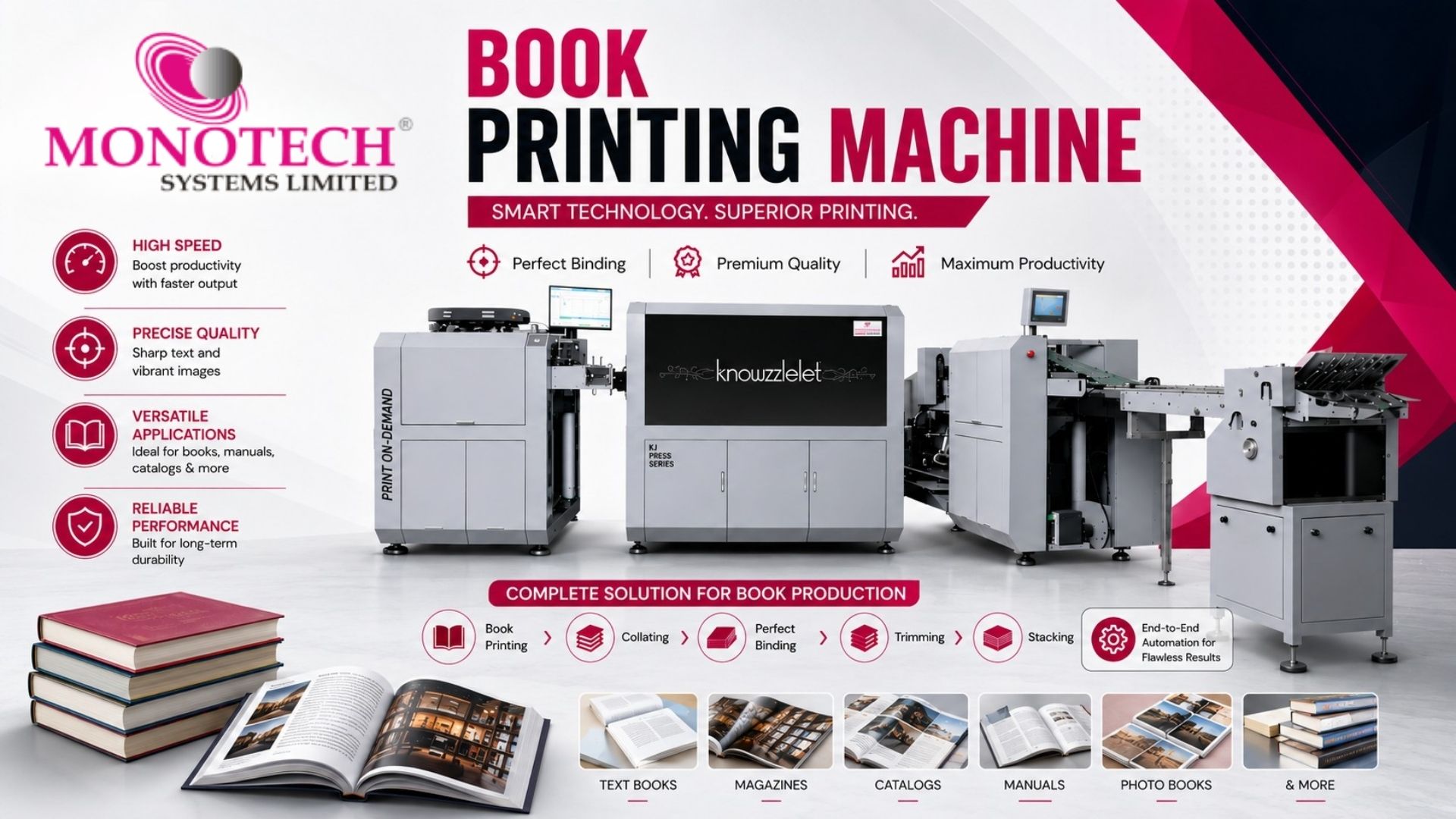
Choosing the right Book Printing Machine is an important decision for publishers, commercial printers, print service providers, and businesses looking to expand their printing capabilities. The right equipment can improve productivity, deliver consistent print quality, support different paper types, and make short-run or on-demand production more efficient.
However, choosing a machine only by its purchase price or advertised printing speed can result in the wrong investment. Factors such as production volume, media compatibility, automation, finishing, operating costs, maintenance, and after-sales support should also be evaluated.
This guide explains the key features buyers should consider before investing in a modern book printing solution.
What is a Book Printing Machine?
Book Printing Machine is designed to produce printed pages for books, textbooks, manuals, catalogs, publications, and other commercial applications. Modern digital printing technology allows businesses to handle both short-run and larger production requirements with greater flexibility.
Depending on the configuration, a Book Printing Press can support monochrome or color printing, different paper sizes and weights, duplex printing, automated workflows, and integration with finishing equipment. Want to explore the features and capabilities in detail? View the detailed PDF to learn more.
10 Key Factors to Consider
1. Printing Speed and Production Capacity
Printing speed directly affects production output and turnaround time. However, buyers should not focus only on the maximum speed mentioned in a specification sheet.
Consider your average monthly volume, peak workloads, average work size, and delivery commitments. Choose equipment that can comfortably handle current production while providing enough capacity for expected business growth.
2. Print Quality and Consistency
Print quality is essential for professional publications. Sharp text, clean graphics, accurate details, and consistent output can influence the final appearance of a book.
When evaluating equipment, request sample prints using the paper and type of content you expect to produce. Check fine text, images, registration, density, and consistency across longer runs.
3. Paper Size, Weight, and Media Compatibility
Different books require different paper specifications. Novels, textbooks, children’s books, manuals, catalogs, and premium publications may use different sizes, weights, and finishes.
Check the machine’s supported media sizes, paper weights, feeding capabilities, paper capacity, and duplex printing functionality. Greater media flexibility can help your business serve a wider range of applications.
4. Color or Monochrome Capability
The choice between color and monochrome printing should depend on your target applications.
- Monochrome printing is suitable for novels, reports, manuals, forms, and other text-heavy publications.
- Color printing is ideal for children’s books, educational materials, illustrated publications, photo books, and visually rich content.
Understanding your customers’ requirements can help you select the right configuration without investing in capabilities you may rarely use.
5. Short-Run and Print-on-Demand Capability
Short-run printing: Digital printing makes it practical to produce smaller quantities without maintaining large inventories.
Flexible production: It benefits publishers, self-publishing businesses, educational institutions, and commercial printers handling customized or frequently updated content.
Print-on-demand: Businesses can print books as orders arrive, helping reduce excess inventory and storage costs.
Faster response: Print-on-demand allows businesses to respond quickly to new customer orders and changing demand.
6. Automation and Workflow Integration
Modern printing operations often involve multiple works with different specifications. Automation can reduce repetitive manual work and help improve workflow efficiency.
Look for features such as automatic paper feeding, duplex printing, job presets, production monitoring, and workflow integration. A properly configured digital printing press can work as part of a connected production environment rather than operating as a standalone machine.
For businesses looking to explore advanced inkjet and digital production solutions, JETSCI® Global by Monotech offers valuable insights into high-speed digital inkjet technology, production workflows, and innovative printing applications.
7. Finishing Compatibility
Printing is only one part of book production. Depending on the application, businesses may also require cutting, folding, creasing, collating, and binding.
Before purchasing, check whether the Book Printing Press can integrate with suitable finishing systems. A connected workflow can reduce manual handling and help move works efficiently from printed sheets to finished books.
8. Operating Cost and Total Cost of Ownership
The machine’s purchase price does not represent the complete investment. Buyers should consider the long-term cost of operating and maintaining the equipment.
Important factors include:
- Ink or toner consumption
- Paper consumption
- Maintenance
- Spare parts
- Electricity usage
- Service expenses
- Production downtime
- Cost per page
- Software and workflow requirements
machine with a higher initial investment may provide better long-term value if it delivers higher productivity, reliable performance, and efficient operating costs.
9. Ease of Operation and Maintenance
A sophisticated machine should also be practical for everyday production. An intuitive interface, simple print setup, accessible maintenance functions, and clear production monitoring can make operation easier.
Operator training should also be considered. If several employees will operate the equipment, a straightforward workflow can reduce the learning curve and support consistent production.
Regular preventive maintenance is equally important because unexpected downtime can affect deadlines, productivity, and customer satisfaction.
10. Reliability, Service Support, and Scalability
- Reliability: Choose equipment that delivers consistent performance with minimal downtime.
- Warranty: Check the warranty coverage and included services before purchasing.
- Technical Support: Ensure timely access to professional technical assistance.
- Spare Parts: Verify the availability of genuine spare parts to avoid extended downtime.
- Installation & Training: Look for proper installation and operator training support.
- Preventive Maintenance: Regular servicing helps maintain machine performance and efficiency.
- Scalability: Choose a solution that can handle increasing workloads and integrate with a broader digital production system as your business grows.
Digital vs. Offset Printing for Book Printing Production
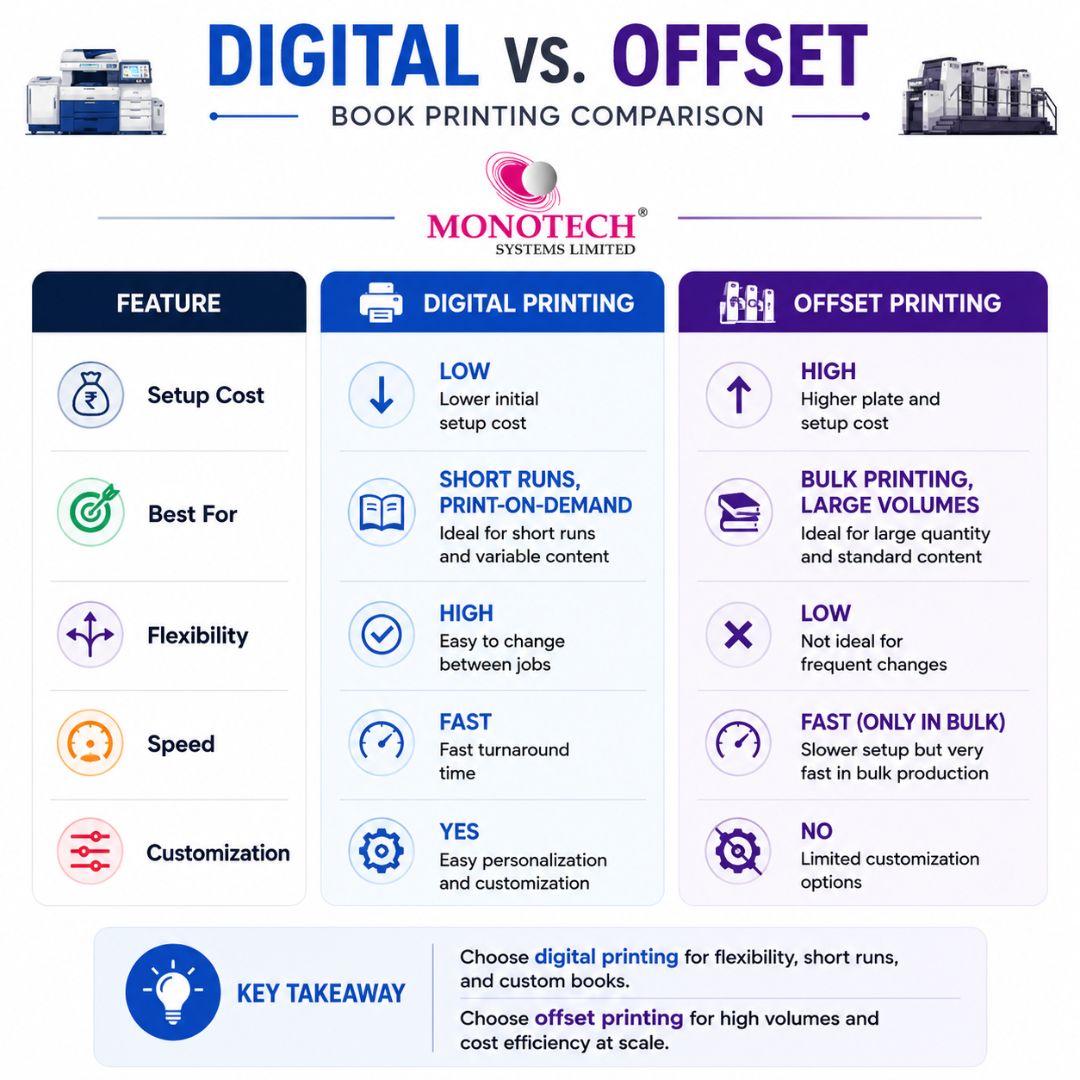
Choosing between digital and offset printing depends on factors such as production volume, turnaround time, job flexibility, and the type of books you plan to produce.
- Digital printing: Is well suited for short runs, print-on-demand, personalized books, and jobs that require frequent changes.
- Offset printing: Can be more cost-effective for large-volume production where the same content is printed in higher quantities.
If your business handles both short-run and high-volume projects, evaluate the expected print volume, cost per book, turnaround requirements, and overall workflow before selecting a printing method. The most suitable technology is the one that aligns with your production needs and long-term business goals.
Which Book Printing Machine is best for your business?
Different businesses have different production requirements. The right machine depends on print volume, speed, media requirements, and workflow. For high-speed, print-on-demand production, JETSCI® knowzzleJet™ is a suitable option to consider.
| Feature | Entry-Level Digital | Mid-Range Production | High-Speed Production |
| Best for | Small businesses | Commercial printers | High-volume production |
| Speed | Moderate | High | Up to 660 ft./min |
| Printing | Basic | Color/Monochrome | Color/Monochrome |
| Print-on-demand | Suitable | Highly suitable | Excellent |
| Duplex printing | Optional | Available | Available |
| Resolution | Varies | High | Up to 1600 dpi |
| Workflow | Basic | Advanced | High-speed PDF workflow |
| Ideal users | Startups | Publishers | High-volume printers |
This high-speed solution combines productivity with print-on-demand flexibility, making it suitable for book production, customized publications, educational content, and variable-data applications.
How to choose the right machine for your business
There is no universal solution for every printing business. Start by identifying your actual requirements.
Ask yourself:
- What is my expected monthly production volume?
- What types of books will I produce?
- Do I need color or monochrome printing?
- What paper sizes and weights will I use?
- Will I primarily handle short runs or large volumes?
- Do I require print-on-demand production?
- What finishing processes will I need?
- What is my total investment budget?
- What are the expected running and maintenance costs?
- What level of technical support will I require?
Answering these questions can make it easier to compare machines based on practical business needs instead of specifications alone.
Book Printing Machine price in India: approximate guide
There is no single standard price for a Book Printing Machine. Pricing can vary significantly depending on printing technology, production speed, automation, configuration, paper handling, and finishing requirements.
| Machine Category | Approximate Price Range in India | Suitable For |
| Entry-level printing equipment | ₹1–10 lakh+ | Small-volume applications |
| Mid-range digital production systems | ₹10–40 lakh+ | Commercial & short-run printing |
| Industrial digital systems | ₹40 lakh–₹1.5 crore+ | High-volume production |
| High-speed commercial systems | ₹1.5–₹3 crore+ | Large publishers & print businesses |
| Specialized industrial systems | ₹3 crore+ | Large-scale production |
These are indicative planning ranges rather than fixed quotations. Actual pricing can vary according to brand, model, printing technology, configuration, automation, installation, taxes, consumables, warranty, service arrangements, and finishing equipment.
For an accurate investment estimate, it is better to request a machine-specific quotation based on your required production volume and application.
Practical buyer checklist
Before finalizing your purchase, ask the supplier for:
- Production specifications based on your workload
- Sample output using your paper and files
- Estimated running cost or cost per page
- Supported media specifications
- Maximum recommended production volume
- Maintenance requirements
- Warranty details
- Service response information
- Spare-parts availability
- Installation and operator training
- Compatible finishing solutions
- Upgrade and scalability options
Getting these details in writing allows you to compare different quotations more accurately and understand the actual investment involved.
Make the right book printing investment with Monotech Systems Limited
Choosing the right Book Printing Machine is about finding the right balance between productivity, print quality, flexibility, operating costs, and long-term support. The right solution can help businesses handle changing customer requirements, improve production efficiency, and build a scalable printing workflow.
If you are planning to upgrade your printing setup or invest in professional book production equipment, Monotech Systems Limited can help you explore suitable solutions based on your application, production volume, paper requirements, and workflow.
Ready to find the right book printing machine for your business? Contact our team today to discuss your requirements, explore suitable printing solutions, and get a solution tailored to your production goals.
What is a book printing machine?
a machine designed to print books, manuals, textbooks, and other publications efficiently.
What is the price of a book printing machine in India?
Prices vary by technology, speed, configuration, and capacity, ranging from lakhs to crores.
Which machine is best for short-run book printing?
Digital printing machines are ideal for short-run and on-demand book production.
What should I check before buying a book printing machine?
Check speed, print quality, paper compatibility, operating cost, automation, and service support.
Is digital printing good for books?
Yes, it offers flexible, high-quality, and efficient printing for different book applications.
How can I reduce book printing costs?
Compare running costs, consumables, maintenance, and productivity—not just the machine price.
 basysPrint
 Cron
Cron Kodak
Kodak HuQ
HuQ G&J
G&J Digicut
 ITOTEC
 RICOH
RICOH Color Logic
 PixelGlow
 PixelFoil
 .
. .
. .
. .
. Miraclon
 akk
akk .
. intaGlios
 pixeljet4
 mimaki1
 agfa1
agfa1 skyjet
 Canon
Canon Contex
 i2s
i2s